
Silk Mobile
Table of Contents (Homepage)
- Overview
- Setting Up
- Getting Started
- How To
- Connecting Devices And Emulators
- Preparing Applications For Testing
- Managing Applications
- Recording Tests
- Working With Test Commands
- Adding Commands To Your Scripts
- Object Commands
- Click
- ClickCoordinate
- ClickIn
- ClickOffset
- Drag
- ElementGetProperty
- ElementGetTableRowsCount
- ElementListPick
- ElementListSelect
- ElementListVisible
- ElementScrollToTableRow
- ElementSendText
- ElementSetProperty
- ElementSwipe
- ElementSwipeWhileNotFound
- GetAllValues
- GetElementCount
- GetElementCountIn
- GetTextIn
- IsElementBlank
- IsElementFound
- IsFoundIn
- LongClick
- RunNativeAPICall
- SendWhileNotFound
- VerifyElementFound
- VerifyElementNotFound
- VerifyIn
- WaitForElement
- WaitForElementToVanish
- GetCoordinateColor
- DragDrop
- Application Commands
- Device Commands
- Web (Hybrid) Specific Commands
- Utilities Commands
- Monitoring Commands
- Configuration Commands
- ExtractLanguageFiles
- SetDefaultClickDownTime
- SetDefaultTimeOut
- SetDefaultWebView
- SetDragStartDelay
- SetInKeyDelay
- SetKeyToKeyDelay
- SetLanguage
- SetLanguagePropertiesFile
- SetShowImageInReport
- SetShowPassImageInReport
- SetShowReport
- SetSpeed
- SetThrowExceptionOnFail
- SetWebAutoScroll
- StartStepsGroup
- StopStepsGroup
- TextFilter
- Miscellaneous Commands
- Controlling Element Identification Rules
- Editing Test Objects
- Executing Test Scripts
- Report Of Executed Test
- Working From Code Environment
- Continuous Integration
- Layout Verification Tests
- Use Device Vitals Monitors
- Troubleshooting
- Terminology
Integration With Microsoft Team Foundation Server (TFS)
When working with Silk Mobile your testing team will enjoy a number of important benefits.
Seamless Integration with TFS
Silk Mobile offers simple integration into TFS and other elements in Microsoft's testing and mobile echo system.
-
Silk Mobile supports all the main mobile operating systems like: Android, iOS, Blackberry, WP8 and more.
-
It enables full native identification support so you don’t have to use less stable OCR or image recognition technologies.
-
You can set up your mobile lab from TFS.
Build Tests in Visual Studio Using C# (or vbscript)
Using the Silk Mobile Visual Studio extension you can create Silk Mobile project.

Using the plugin Silk Mobile menu, you can import tests and view execution results.
Full Support for Windows Phone 8
Using Silk Mobile you can build tests for your WP8 application:
-
You can work with real devices (developed enabled) or emulators.
-
You can perform a full application cycle, installing your applications, launching and uninstalling them.
-
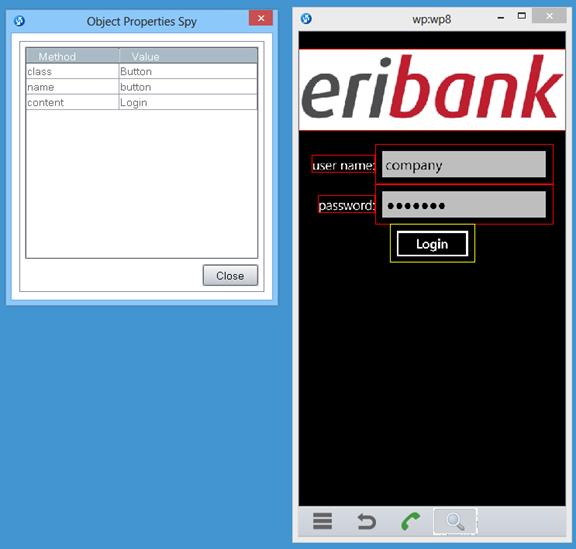
You can build your test by simply recording it, as well as using the ‘Object Spy’ to reveal the element's properties.
-
You can view results that contain a screen shot of where the identified element is highlighted.
